




Higher education DEEN

University processes digital in weeks, not campus software in years.

HIS-GX and QIS are being discontinued, and many universities face a system change. With the MR.KNOW BPM platform you extend your campus management with processes your administration adapts itself and replace legacy applications step by step. Your team gains time for advising instead of paperwork.

In production use, among others at the University of Stuttgart.

  • 🔒 GDPR-compliant
  • 🇩🇪 Made in Germany
  • ⚙️ BPMN 2.0
  • ☁️ Cloud or on-premises
The MR.KNOW comic characters Made in Black Forest
Software Made in Europe 2026 KI-Allianz GDPR compliant gfo Innovation Award 2020 – ITSG digital case processing project

Challenges and our solution

HIS eG, the vendor behind most German campus software, has terminated the licences for HIS-GX and QIS; the entire software generation has to be replaced by 2030. The obvious successor is yet another large suite. MR.KNOW starts with the process instead, not the data model.

Challenge

Fixed deadlines for legacy systems

From 31 May 2027 there is no more maintenance for SOS/QISSOS; the final release for POS/QISPOS and LSF follows in December 2028.

Our solution

Move step by step, not on a set date. Each workflow the legacy system carries today moves to the platform on its own. The legacy system is relieved piece by piece.
Challenge

Implementation projects lasting years

Moving to a new campus suite can take up to 7 years at large universities, sometimes with parallel operation.

Our solution

The first process in weeks. After a three-day workshop and around ten days of detailed specification, the first workflow goes live in month one, the next ones follow month by month.

Challenge

Rigid standard

Local workflows, examination regulations and special cases rarely fit the standard. Changes often require an order to the vendor.

Our solution

Processes you change yourself. Every workflow is a readable BPMN 2.0 model. Your departments adapt it without programming.

Challenge

High workload in administration

Examination offices, student services and IT carry the transition alongside day-to-day work, and routine tasks eat into time for advising.

Our solution

Assistants for the routine. Completeness checks, deadlines and documents run automatically. Your staff decide and gain time for advising.

Sources: HIS eG, Release Special 2024.12 (deadlines) · HIS eG on the introduction at the University of Bonn · University of Freiburg computing centre (all in German) · As of

Solution examples for universities

Sixteen workflows from our projects with universities and education providers, shown with sample data (screens in German). Click an image to see it full size.

Student lifecycle

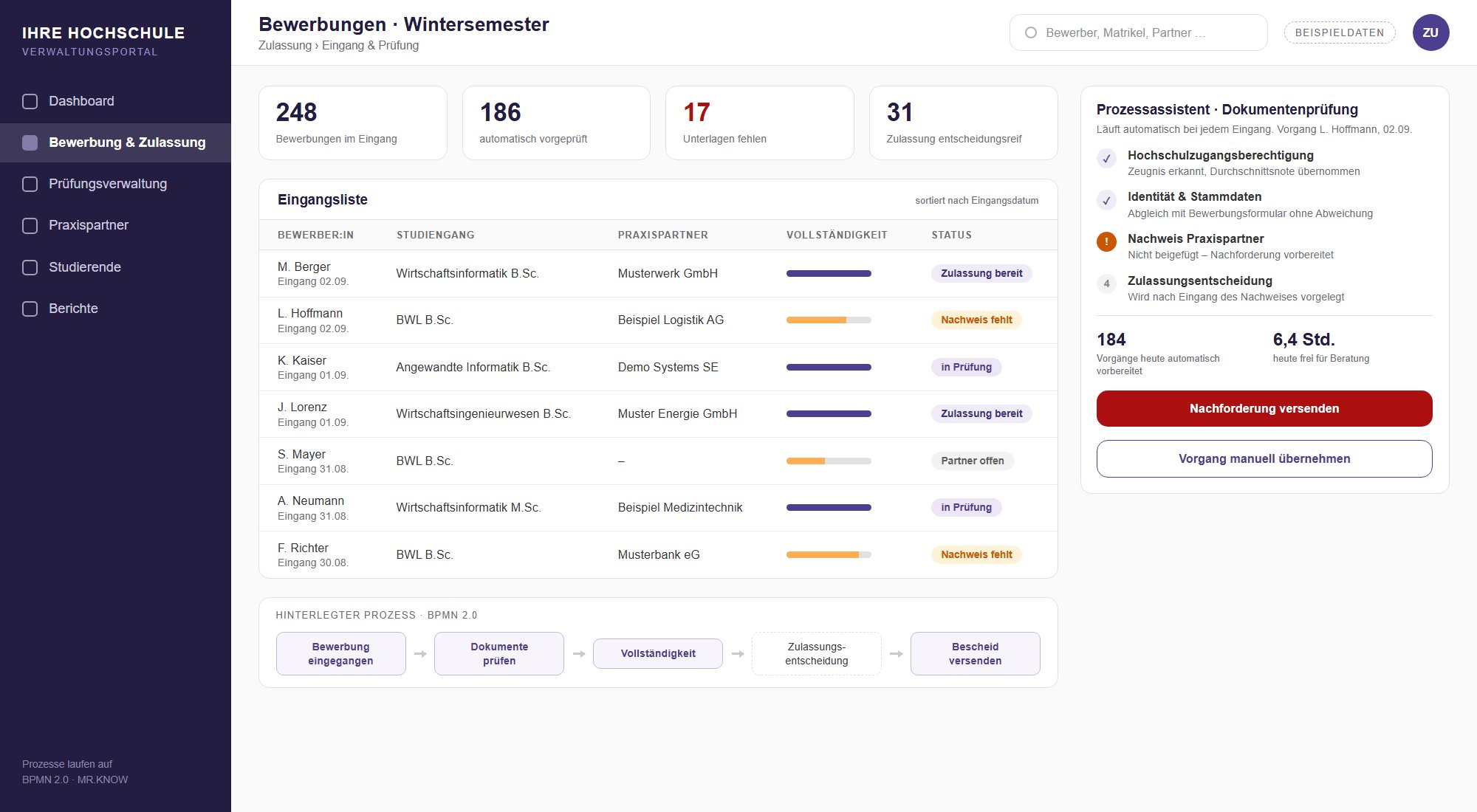
Applications and admissions

Documents are read on arrival and checked for completeness, missing evidence is requested specifically. Your team decides on admission, with the cases ready for decision bundled together.

Discuss this workflow
Project example with sample data: incoming applications with completeness check

Studies and examinations

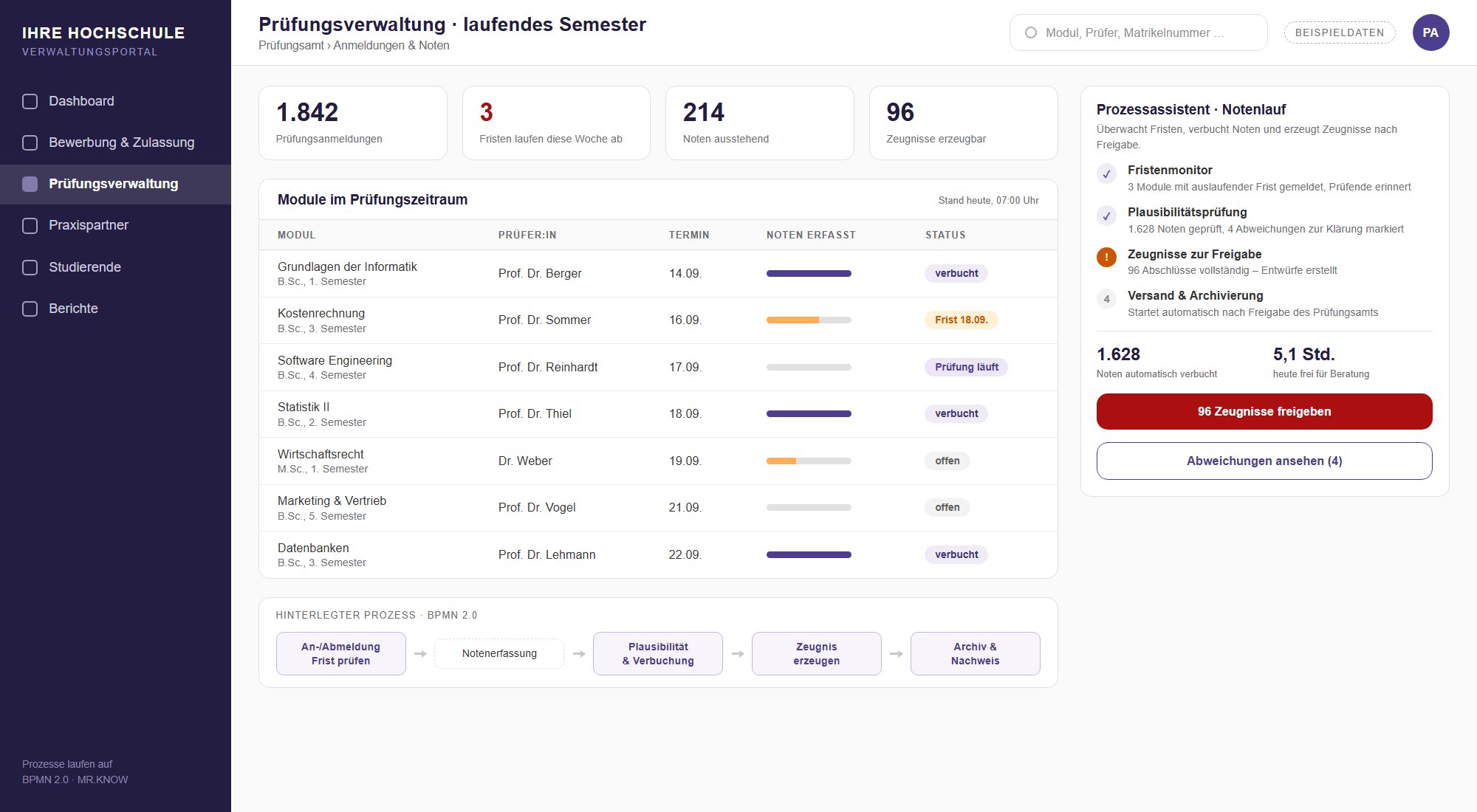
Examination management

Registration and withdrawal deadlines are tracked in the background, grades are checked for plausibility and certificates are generated and archived after approval.

Discuss this workflow
Project example with sample data: examination management with deadlines and grading

Studies and examinations

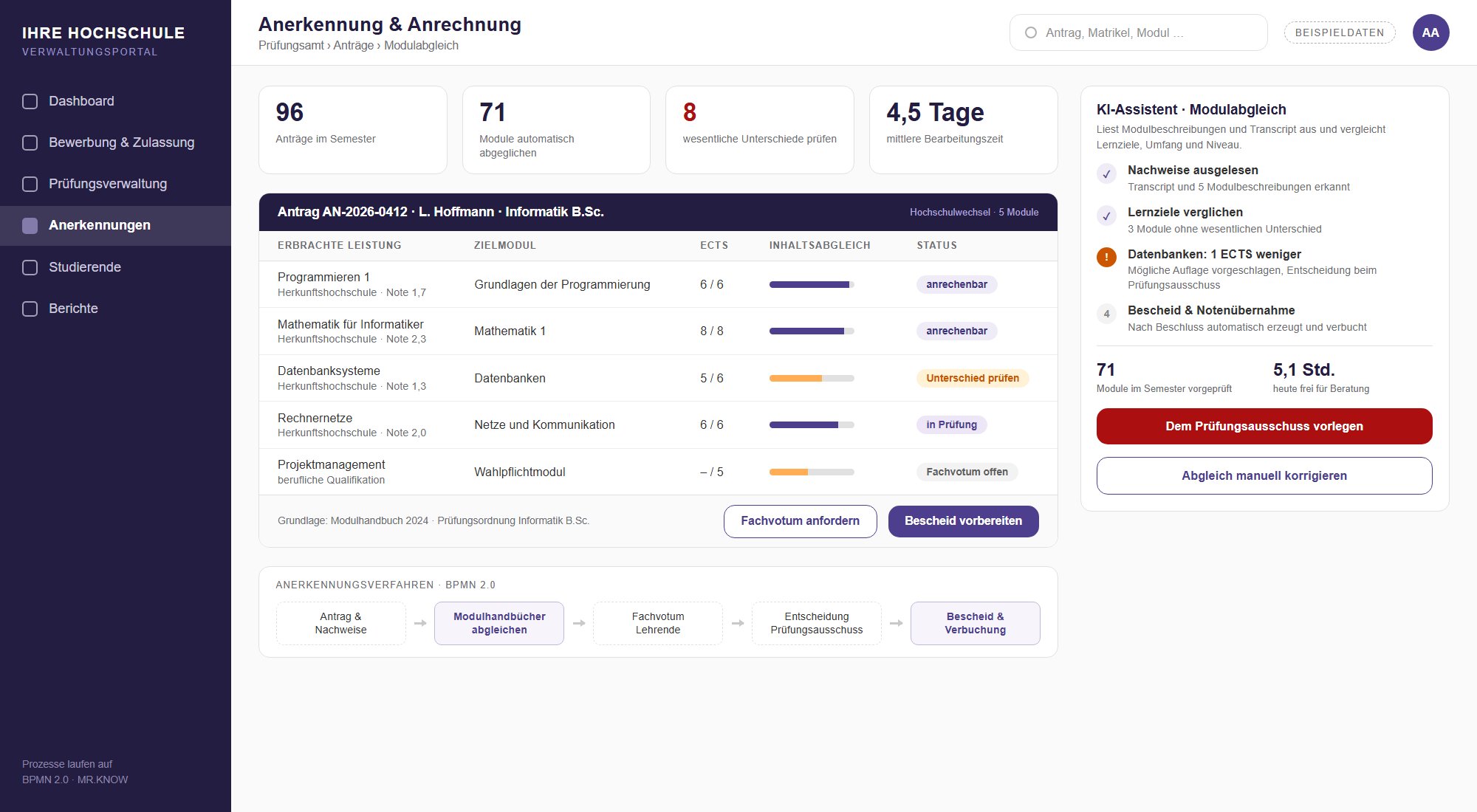
Recognition of credits

Module descriptions and transcripts are compared and differences highlighted. The examination board decides on a well-prepared basis.

Discuss this workflow
Project example with sample data: module comparison for credit recognition

Dual study

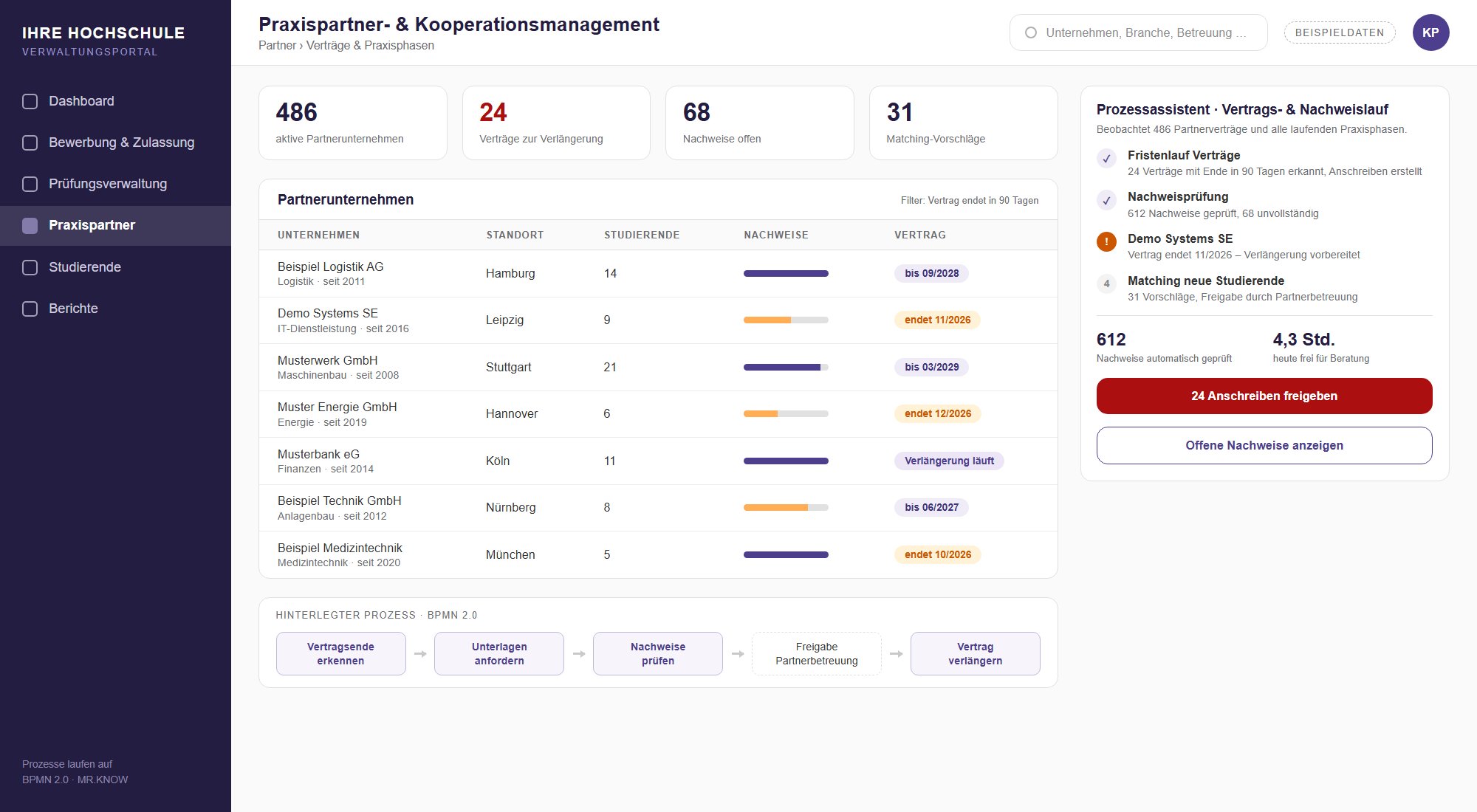
Practice partners and contracts

Expiring cooperation agreements are detected, training records are checked continuously and matches with companies are prepared.

Discuss this workflow
Project example with sample data: practice partner management with contracts and records

Self-service

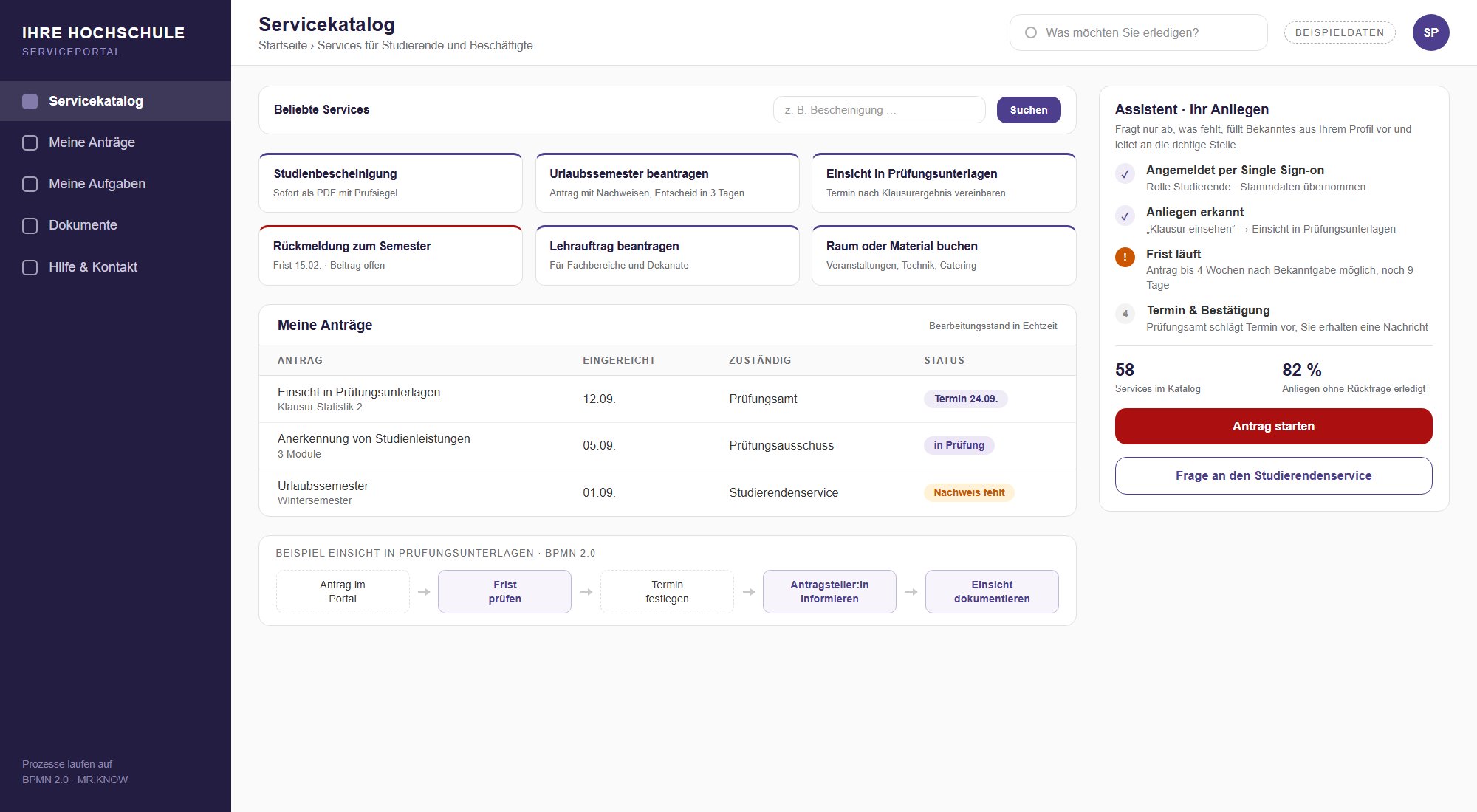
Service portal for students and staff

Service catalogue, requests and processing status in one place. The assistant only asks for what is missing and forwards the request to the right office.

Discuss this workflow
Project example with sample data: service catalogue and my requests in the service portal

Teaching

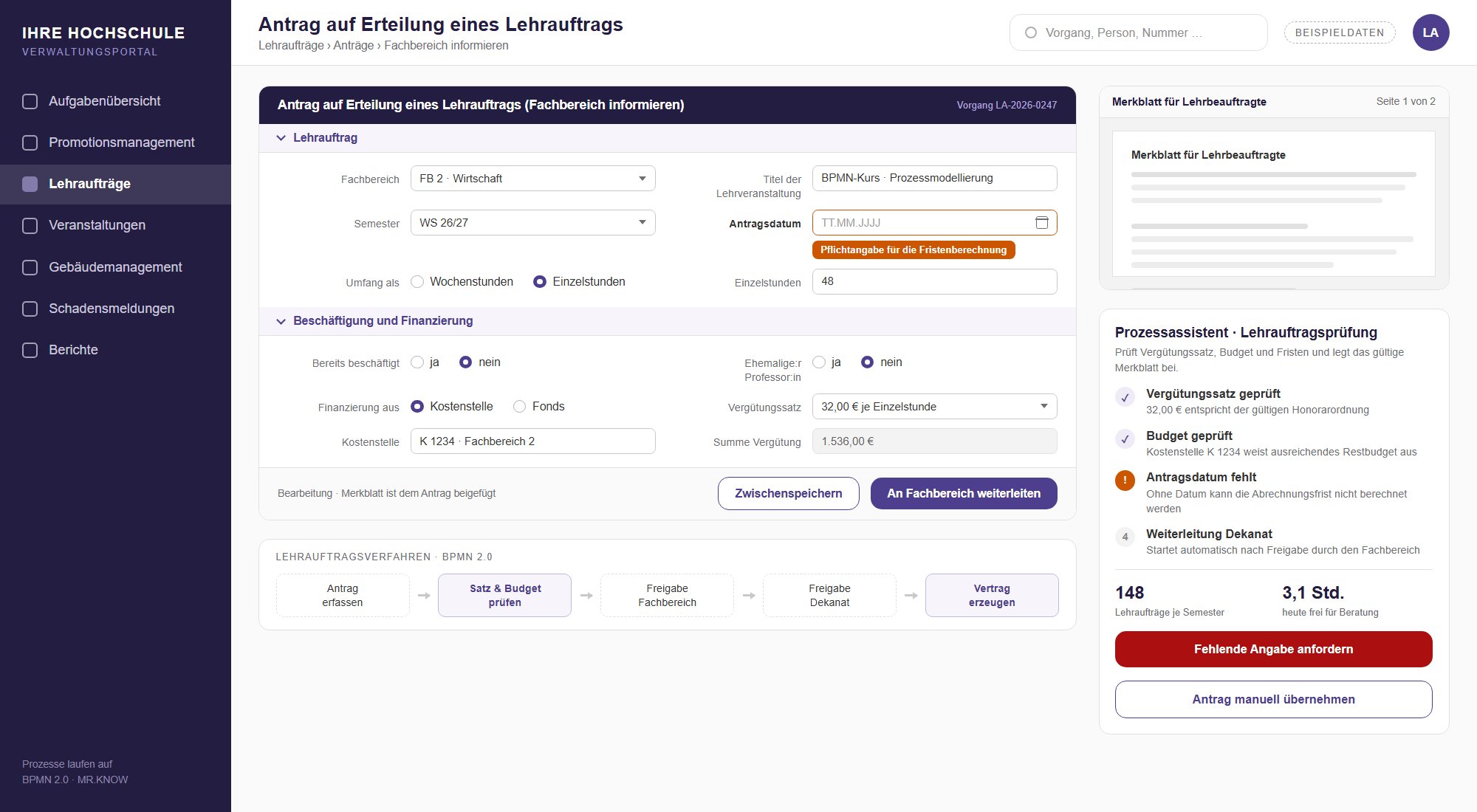
Teaching assignments

From the department's request to the contract: pay rate, budget and deadlines are checked, and the current information sheet is attached automatically.

Discuss this workflow
Project example with sample data: request for a teaching assignment

Research

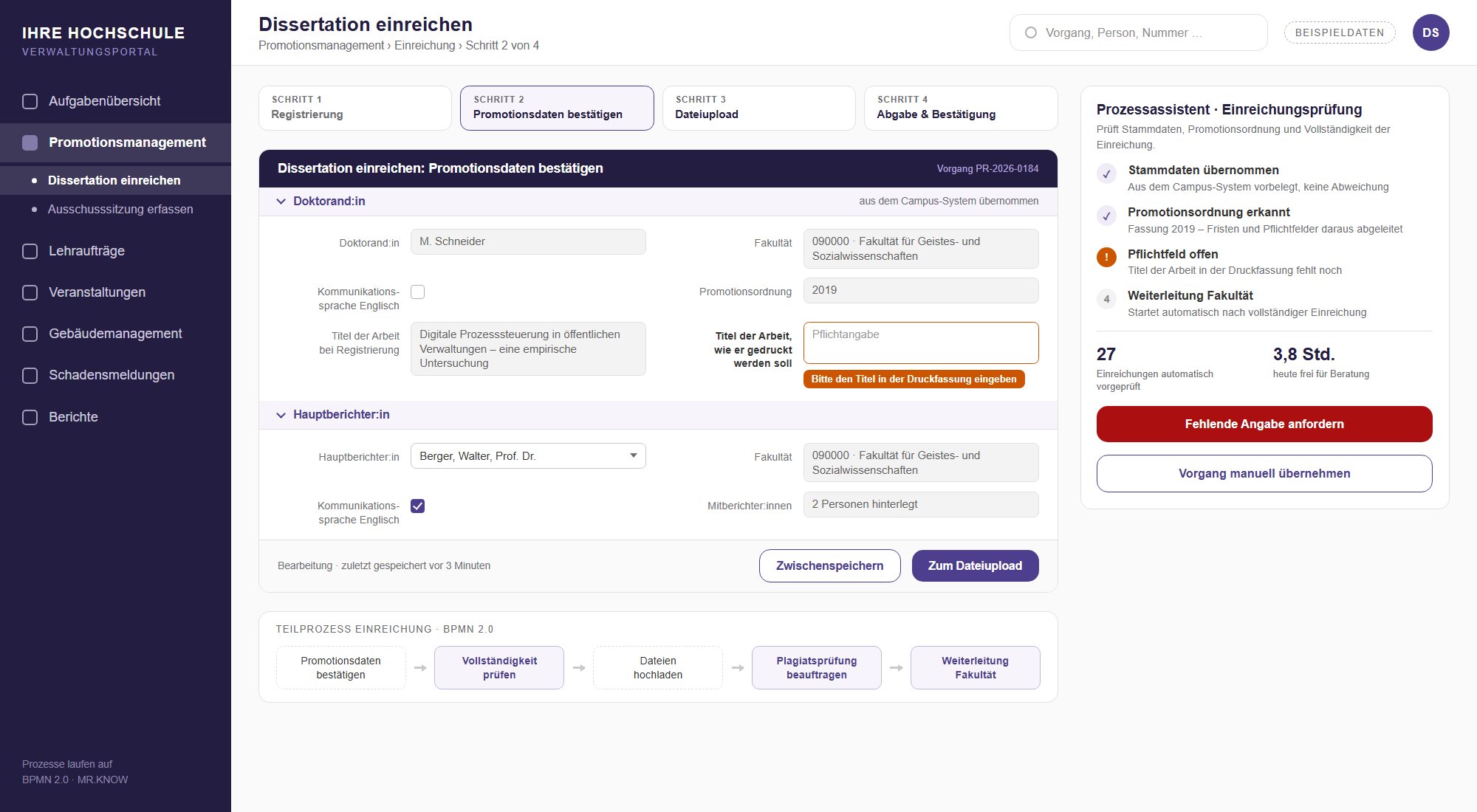
Doctoral management

Submission, committee meetings and deadlines according to the applicable doctoral regulations, including statutory higher education statistics.

Discuss this workflow
Project example with sample data: submitting a dissertation in doctoral management

Quality

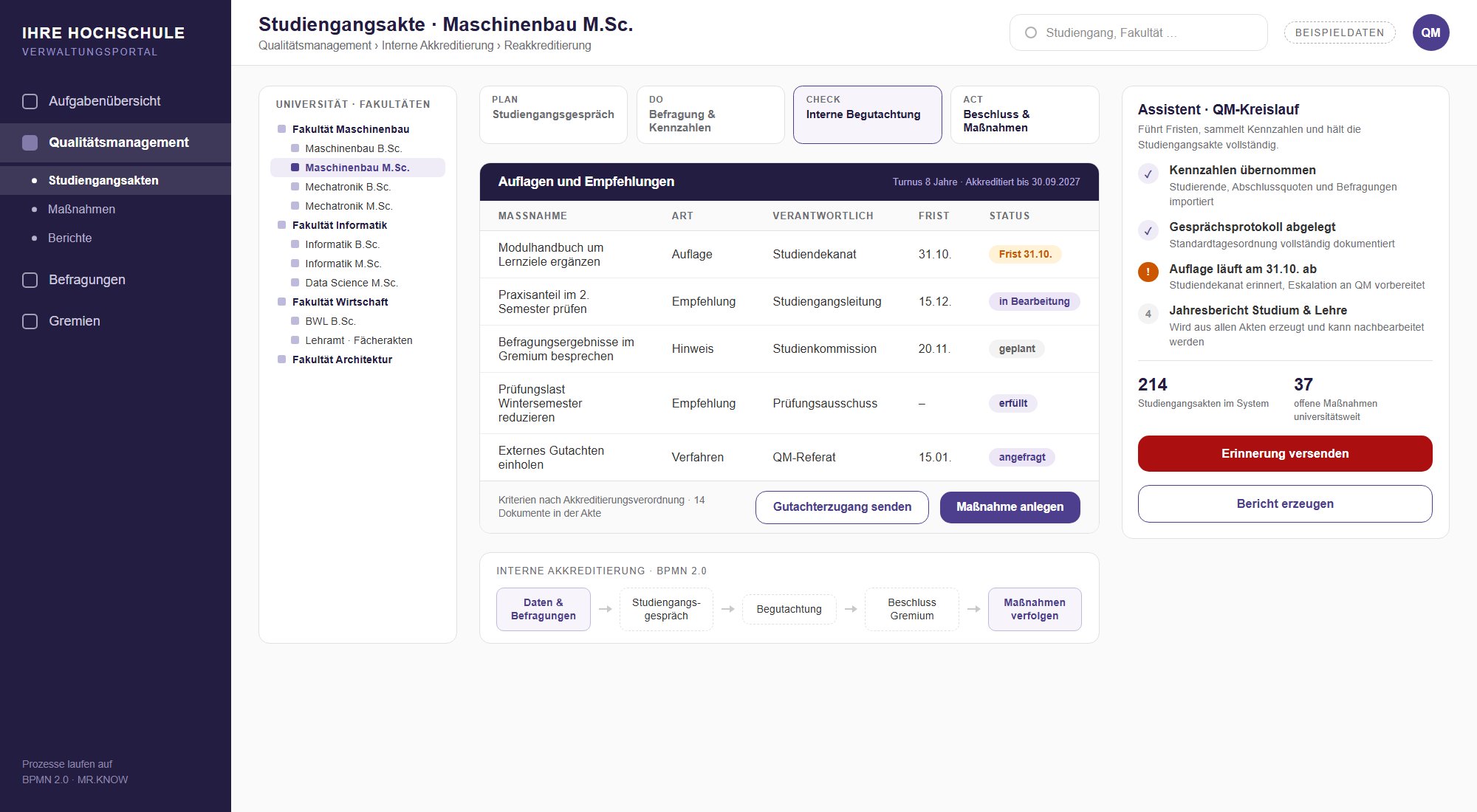
Programme files and accreditation

Conditions, recommendations and deadlines in the quality cycle, with access for external reviewers and reports at the push of a button.

Discuss this workflow
Project example with sample data: programme file with conditions and recommendations

Campus

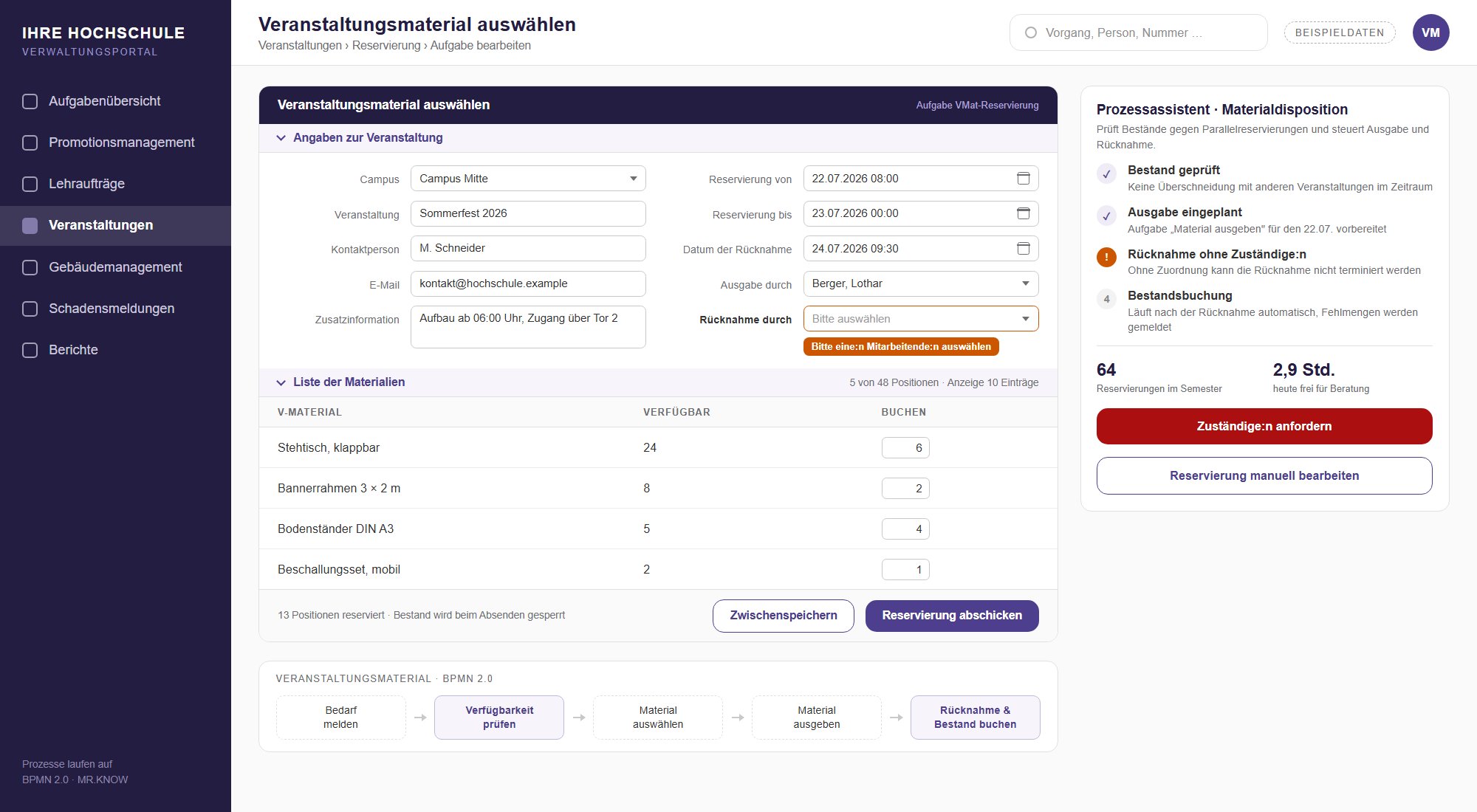
Event and material planning

Rooms, equipment and material are reserved and scheduled. Bottlenecks show up before the event, not on the day.

Discuss this workflow
Project example with sample data: selecting event material

Campus

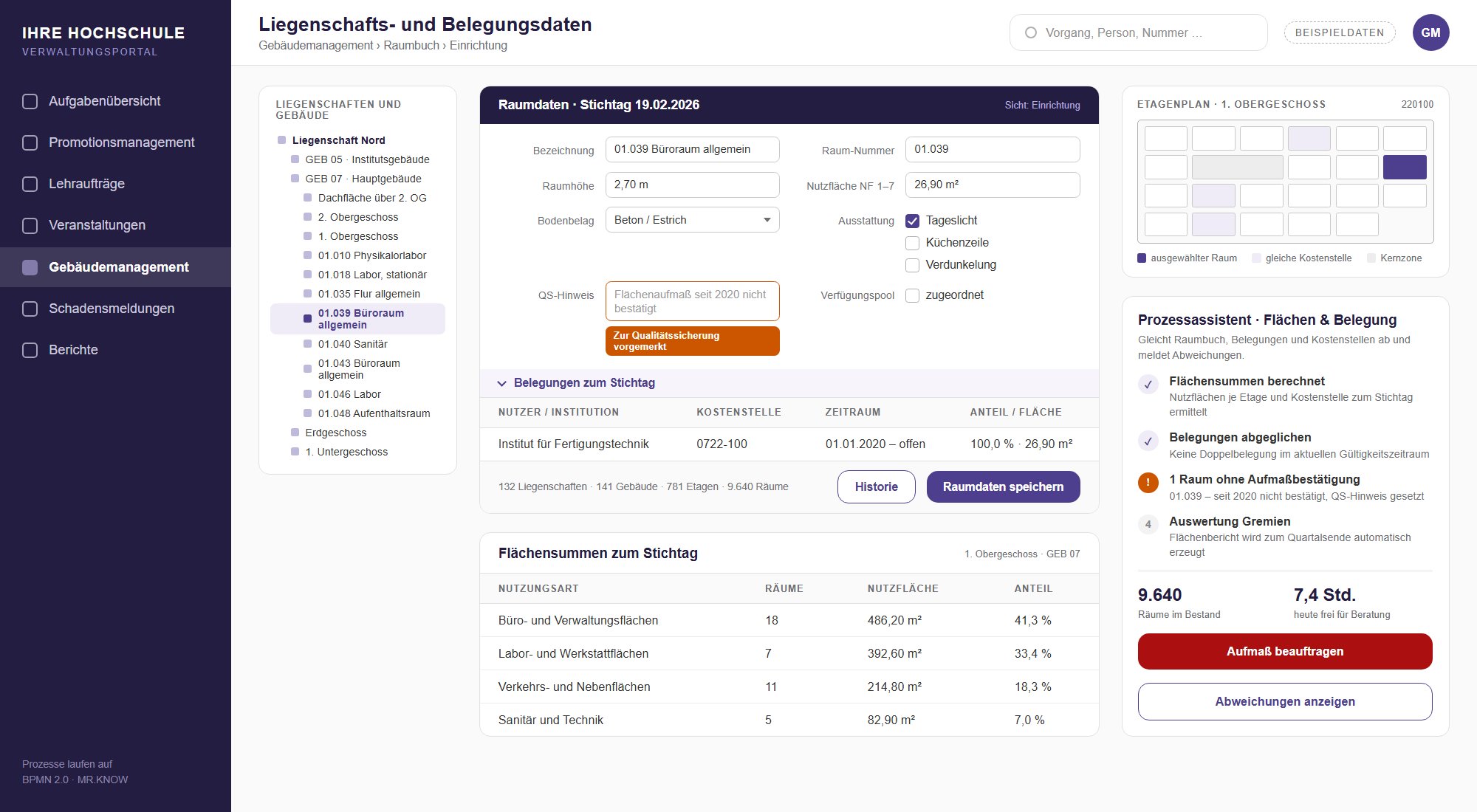
Building and space management

Room register, occupancy and cost centres are reconciled, and space reports for committees are generated automatically.

Discuss this workflow
Project example with sample data: property and occupancy data

Campus

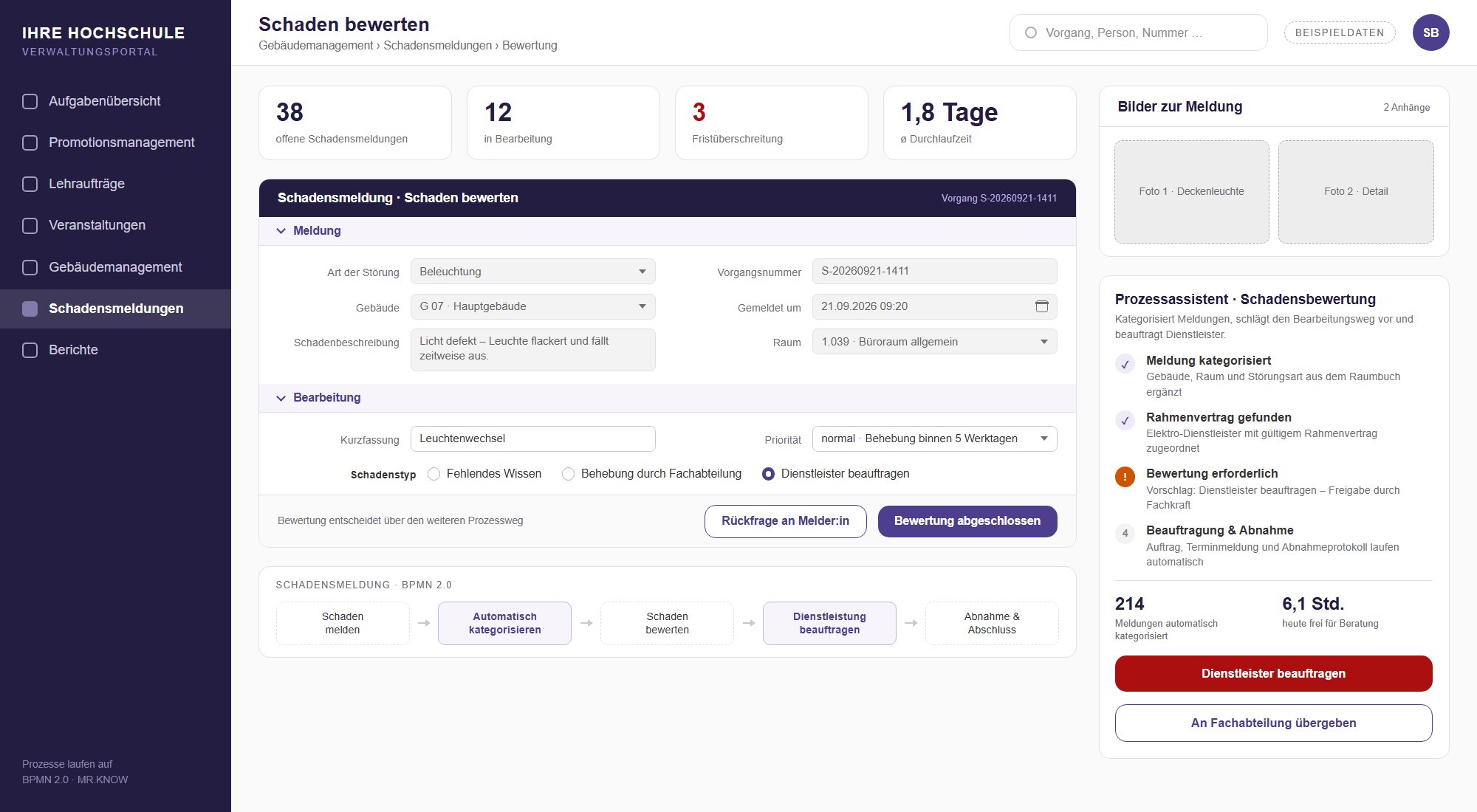
Damage reports

Reports from the portal are assessed, prioritised and passed to facility services or contractors, with feedback to the reporter.

Discuss this workflow
Project example with sample data: assessing damage

Human resources

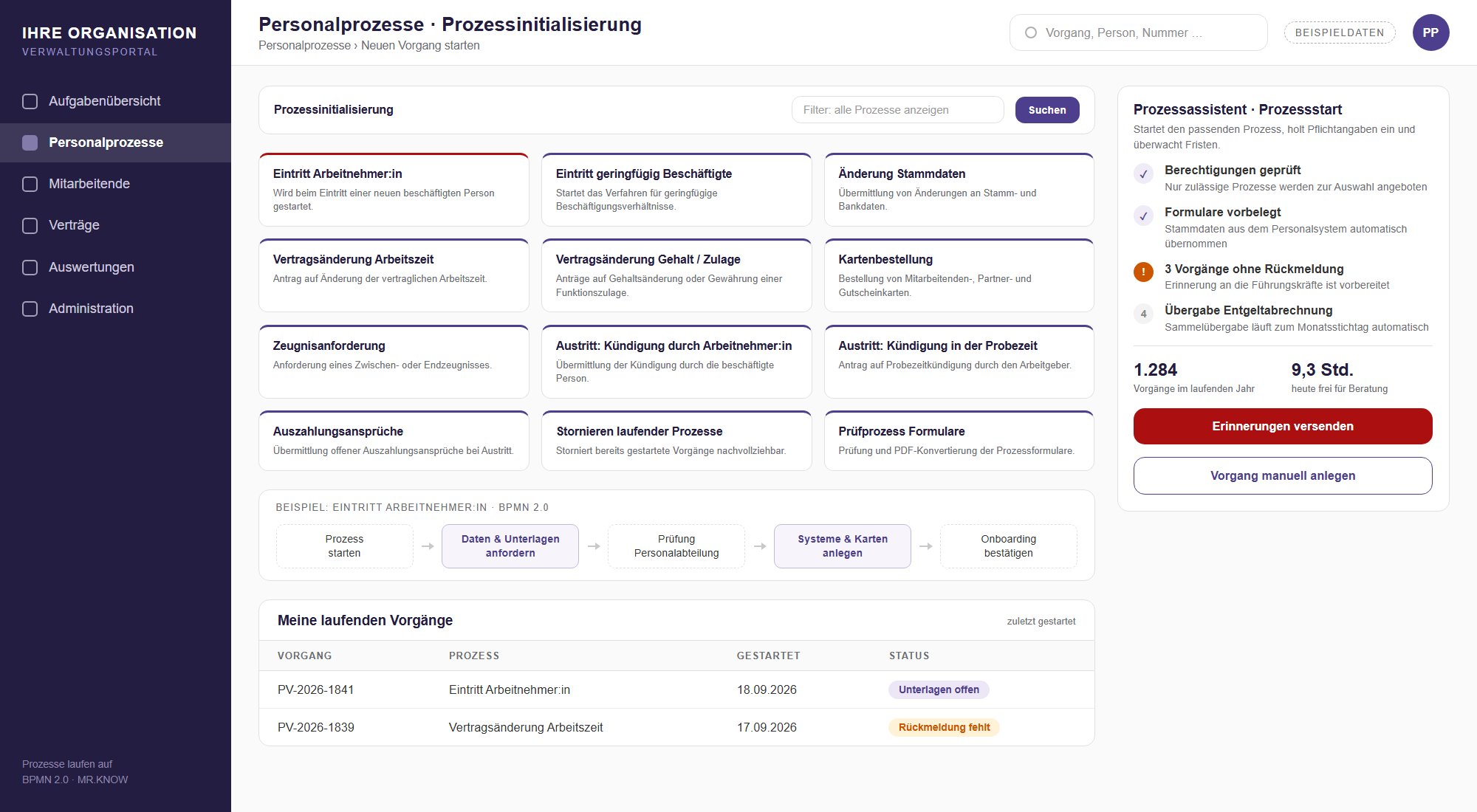
HR processes

Hiring, contract changes and leaving as guided cases, with the staff council and equal opportunities office involved.

Discuss this workflow
Project example with sample data: starting an HR process

Human resources

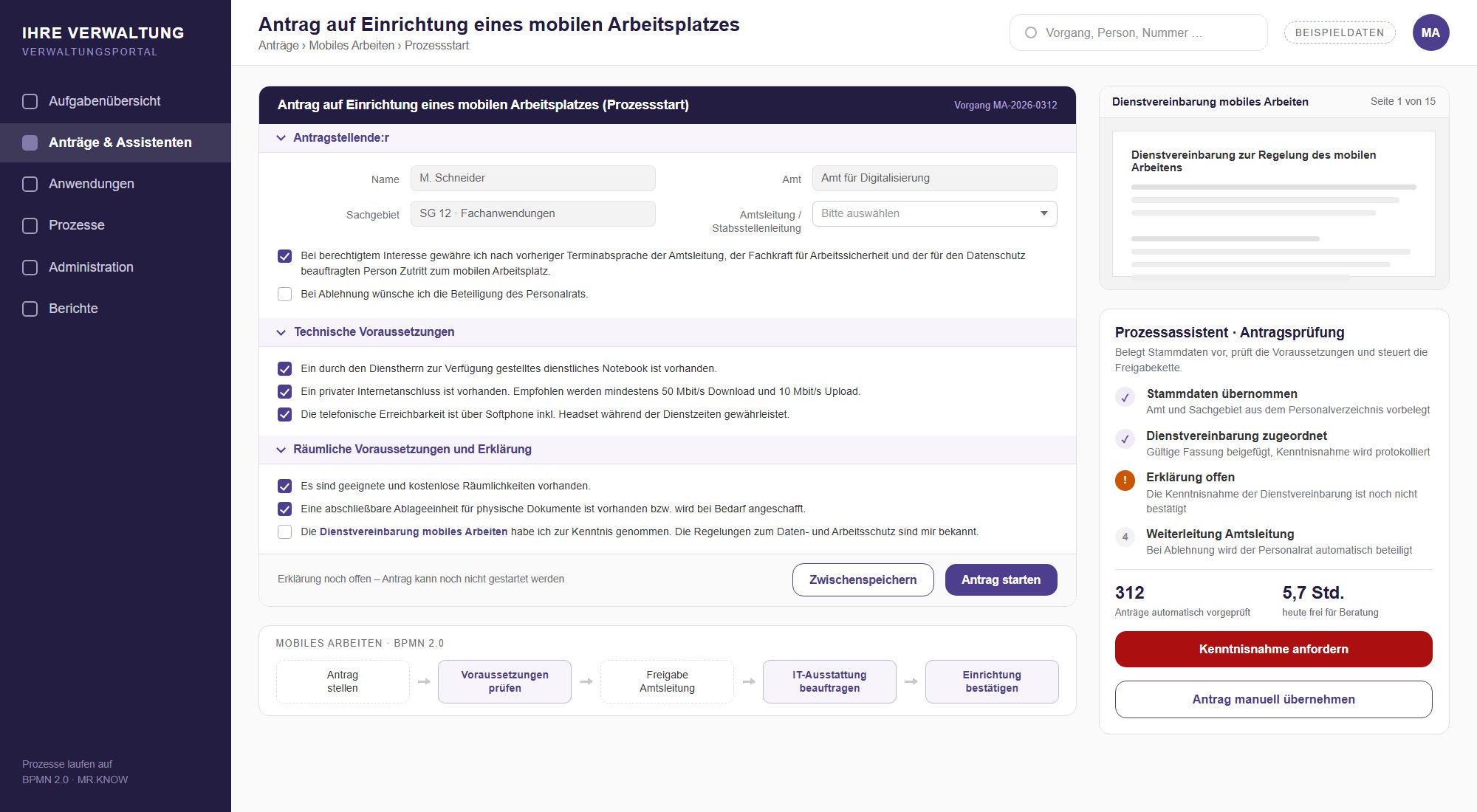
Mobile working

Request, approval by the line manager, equipment and agreement in one continuous workflow.

Discuss this workflow
Project example with sample data: request for a mobile workplace

Finance

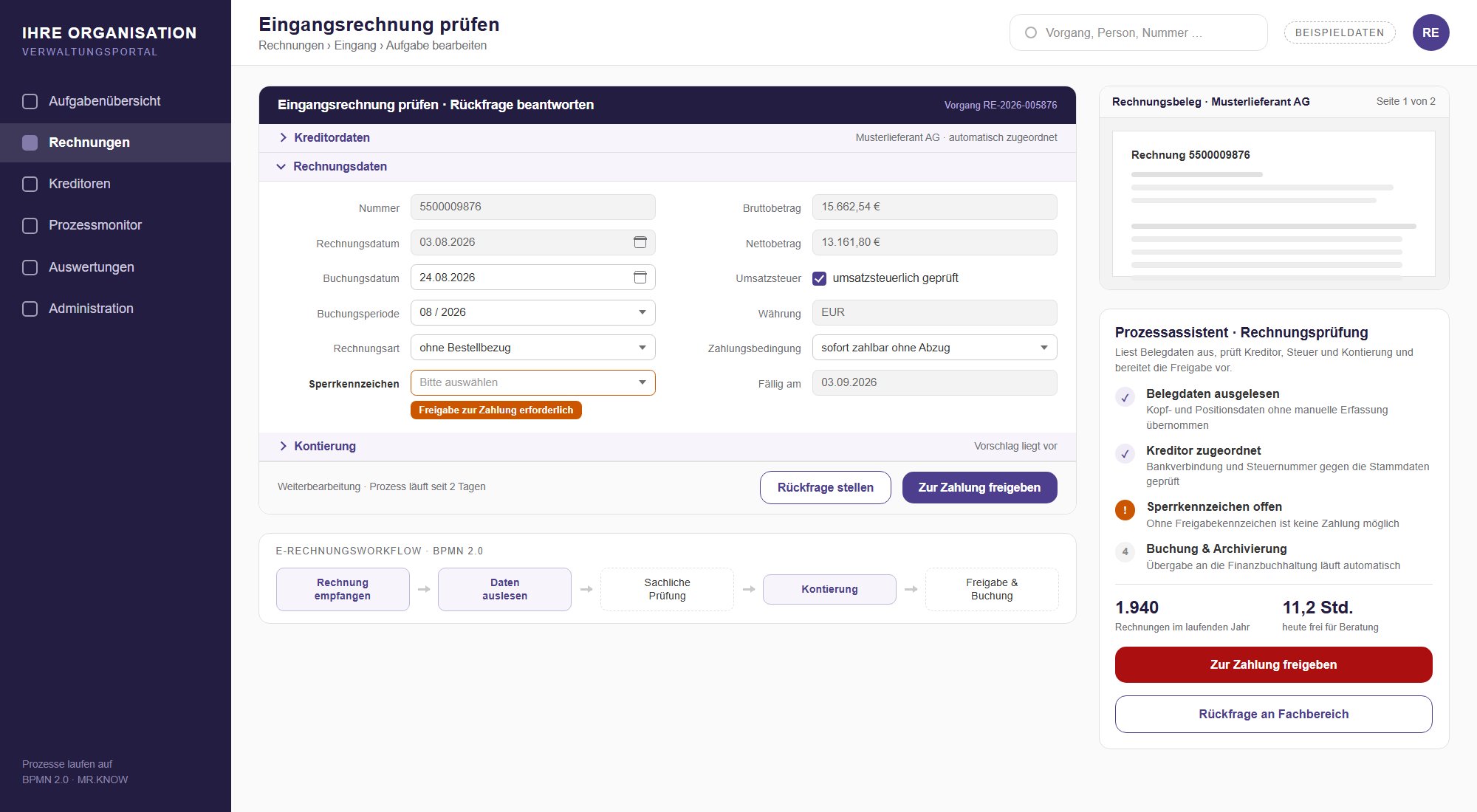
E-invoicing

Invoice data is extracted, supplier, tax and account assignment are checked. Payment approval stays with you.

Discuss this workflow
Project example with sample data: checking an incoming invoice

Education providers

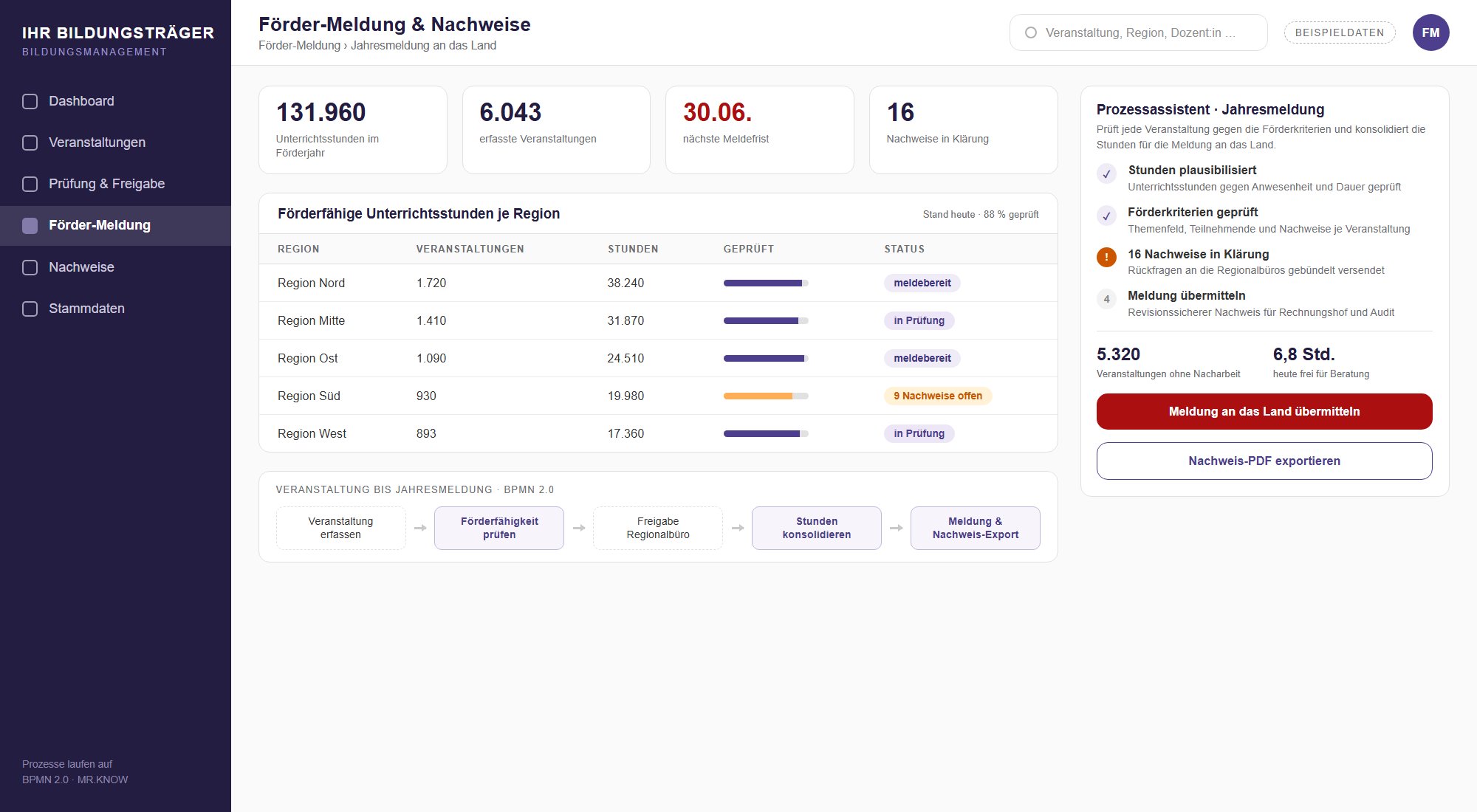
Funding reports

Teaching hours are checked per course and consolidated for the annual report to the state, audit-proof for auditors and the court of audit.

Discuss this workflow
Project example with sample data: funding report and evidence per region

Education providers

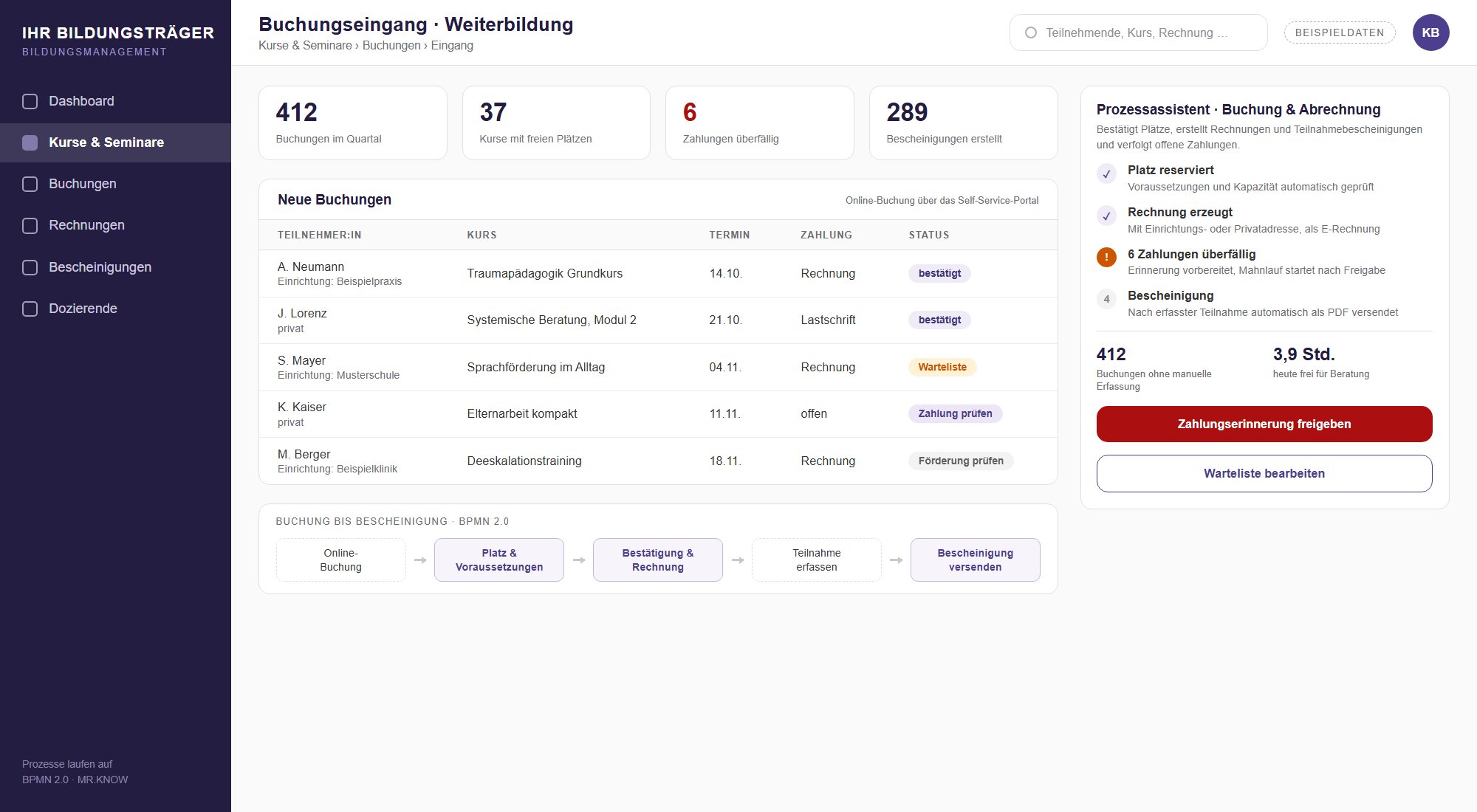
Course and seminar booking

Online booking, confirmation, invoice and attendance certificate in one workflow. Open payments are followed up.

Discuss this workflow
Project example with sample data: incoming bookings for continuing education

1 of 16

Three paths, one principle: step by step

Whether you keep your campus management system, replace it or, as an education provider, face quite different obligations: you start with one process and build from there.

Extend: around your campus management

For universities that keep HISinOne, CAMPUSonline or SAP. MR.KNOW covers the workflows that are missing there or too rigid, and exchanges data via interfaces.

  • Self-service portal for requests
  • Teaching assignments and exam review
  • Doctoral management with statistics reporting
  • Quality management and accreditation

Replace: module by module

For private and dual universities that want to leave a closed system behind. Each process goes live on its own, and the legacy system is relieved step by step instead of being switched off on a set date.

  • Applications and admissions
  • Examination management and certificates
  • Practice partners and contracts
  • Fees and dunning

Education providers: courses, funding, records

For continuing and adult education institutions. Planning, booking, invoicing and funding reports run in one process, audit-proof for funding bodies and auditors.

  • Online booking via self-service
  • Invoices and attendance certificates
  • Funding reports on time
  • Evidence for ISO 9001 and AZAV

Which path suits your university? We work it out together in a scoping workshop.

Request a scoping workshop

Where process automation relieves universities

Rated by case volume, rule-based structure and manual effort: these are the areas where your administration wins back the most time.

Student lifecycle

  • Applications, completeness check and decision letter
  • Enrolment and re-registration
  • Onboarding of new students
  • De-registration and certificates

Studies and examinations

  • Exam registration and withdrawal with deadlines
  • Grade entry with plausibility checks
  • Recognition of prior credits
  • Transcripts and diplomas after approval

Practice and dual study

  • Practice partner and contract management
  • Work placements and training records
  • Suggestions for matching with companies
  • Cooperation agreements with deadline monitor

Teaching and quality

  • Teaching assignments from request to payment
  • Programme files and internal accreditation
  • Tracking conditions and recommendations
  • Reports for deans and the executive board

Research and doctorates

  • Doctoral management up to the certificate
  • Committee and board meetings
  • Statutory higher education statistics
  • Expert reports and circulation procedures

Administration and campus

  • Room, building and damage management
  • Event and material planning
  • HR processes and business travel
  • E-invoicing and procurement

Process, not data model: the difference

Classic campus suites fit the university into a fixed data model. MR.KNOW maps its workflows and keeps them changeable.

Generalised view of typical architecture patterns, not an assessment of any single product.
CriterionClassic campus suiteMR.KNOW
IntroductionLarge project over many years, often with parallel operationFirst process in weeks, then one process after another
ChangesOften only possible via the vendorConfigured by the university itself, without programming
TransparencyProcess logic hidden in program codeReadable, versioned BPMN 2.0 models
ParticipantsMostly internal usersApplicants, practice partners, reviewers and lecturers inside the process
AIHardly availableAI agents can be integrated as standard on request
Lock-inClosed architectureOpen standard, process knowledge stays with the university

One portal for students, lecturers and partners

All processes in one place: students, lecturers, staff and external partners find requests, processing status and tasks in a single portal. It runs on the same platform as your processes and grows with every new workflow.

Staff sign in via single sign-on. External parties such as applicants, reviewers or practice partners are brought directly into the case, and committees such as the staff council or equal opportunities office take part for a limited time with their own permissions. Service catalogue, status tracking and a personal task list are standard.

For students this means certificates instantly as PDF, requests such as a leave of absence or exam review without paper, and always visible where a case stands. Lecturers see pending approvals and deadlines in one place, and administration receives complete requests instead of follow-up questions by email. Your team creates new services itself, with forms and workflows it maintains without programming.

Learn more …

  • Sign-in and rolesSingle sign-on via SAML2/Shibboleth, connection to your identity management, roles and permissions per process.
  • BilingualInterfaces and processes in German and English.
  • Data protectionGDPR-compliant with a data processing agreement, technical and organisational measures and configurable deletion periods.
  • InterfacesREST, SOAP and a data hub, for example to HISinOne, SAP, EvaSys, Stud.IP or Microsoft 365.
  • OperationCloud or on-premises, with a test environment and audit-proof storage.

Reference and use scenarios

The University of Stuttgart uses MR.KNOW in production. The two scenarios next to it show typical starting points we work out with universities and education providers.

Reference: University of Stuttgart

Around 22,000 students. Doctoral management runs digitally, and the annual statutory statistics report to the state statistics office is generated from the process data.

  • Doctoral management
  • Space and building management
  • Procurement of event material
  • Automated process models

Read the reference

Scenario: private dual university

Growth, a second campus and hundreds of practice partners. Instead of replacing the legacy system on a set date, the first three processes go live one month apart.

  • Month 1: applications and admissions
  • Month 2: examination management
  • Month 3: practice partner management
  • Then further processes at your own pace

Scenario: adult education provider

Thousands of courses a year, planned across many regional offices. Recording, checking and the funding report to the state run in one process instead of spreadsheets.

  • Recording directly in the regional office
  • AI plausibility check of teaching hours
  • Deadline monitor for the annual report
  • Audit-proof evidence export

How to start: from workshop to first process

No big project up front: we start with the process that ties up your administration most and prove the benefit with your own figures.

  1. Scoping workshop

    3 days. Capture processes, define current and target state, choose the first processes, involve the staff council early.

  2. Detailed specification

    Around 10 days. Define the first processes in detail: workflows, forms, rules, interfaces and benefit with real data.

  3. First process live

    From month 1. Model, interfaces and connections, then the next processes month by month.

  4. Evolve it yourself

    Ongoing. Your key users adapt processes without programming and without a change request to us.

A three-day workshop, and you know which process starts first and what it delivers.

Request a scoping workshop Request a callback

Licence models and operation

Start small or plan for the whole university straight away: you choose the model that fits your budget and project.

Entry: a single application

from €603 per month plus VAT for one assistant or BPM application, for example teaching assignments or exam review.

  • 100 cases per month included
  • Monthly, no big project
  • Extendable to further processes at any time

Get started

Campus licence as rental

The platform for the whole university, with as many processes as you need. Running costs instead of investment, priced by the size of the university.

  • All faculties and institutions
  • Predictable annual costs
  • Maintenance and updates included

Request a quote

Campus licence for purchase

For universities with an investment budget: a one-off licence for the whole university, plus an annual contract for maintenance and support.

  • One-off investment
  • Maintenance and support as annual contract
  • Evolve it yourself with no-code

Request a quote

Operation either in the MR.KNOW cloud or on-premises in your own data centre. A case is a started process, such as a request. Prices for campus licences on request.

Frequently asked questions

The essentials about the BPM platform, the introduction and replacing legacy HIS applications.

What is the MR.KNOW BPM platform?

A no-code platform for business process management based on BPMN 2.0. Workflows are created as graphical models, equipped with forms, interfaces, connections and assistants, and executed directly. Departments can read and change the models without programming. The platform runs in the cloud or on your own servers.

Will automation lead to job cuts in administration?

That is not the point. What gets automated are routine steps such as completeness checks, deadline monitoring, reminders and documents. Decisions, advising and discretion stay with your staff. The time gained goes into advising, into tasks that have been left undone and into the transition itself. We involve the staff council from the start.

Which tasks does automation take over at universities?

The rule-based share of administrative work: checking applications for completeness, monitoring deadlines for exam registration and exam review, checking grades for plausibility, preparing certificates, guiding teaching assignments and placement contracts through approvals, and generating statutory higher education statistics from process data. It connects to campus management, SAP, EvaSys, Stud.IP or Microsoft 365.

What role does AI play?

AI helps where documents have to be read or compared, for example when extracting data from certificates or comparing module descriptions for credit recognition. It suggests and documents, but it does not decide: admissions, grades and recognition are still decided by a person. The AI models are interchangeable and prompts are managed centrally.

Is MR.KNOW an alternative to HIS?

For many workflows yes, but not as yet another all-in-one suite. Private and dual universities replace their existing system with MR.KNOW one process at a time, starting with applications, examination management or practice partners. Public universities usually keep HISinOne or another campus management system for master data and examination law and extend it with processes that are missing or too rigid there. A scoping workshop clarifies which path fits.

What does the end of HIS-GX and QIS mean?

HIS eG terminated the licence agreements for GX and QIS in May 2022. Maintenance and support for SOS/QISSOS end on 31 May 2027; POS/QISPOS and LSF receive their final release in December 2028, followed by 18 months of maintenance. Universities still working with these modules have to restructure their workflows in the coming years. That is the right moment not just to migrate processes but to simplify them.

Can MR.KNOW connect to HISinOne?

Yes, via web services (REST and SOAP), database interfaces and the platform's data hub. Typically MR.KNOW reads master data from campus management, runs the case and returns results such as status or documents. Which interfaces your installation offers is clarified in the scoping workshop.

How long does the introduction take?

A three-day scoping workshop captures the processes and defines current and target state, followed by a detailed specification of around ten days. After that, the first process usually goes live in the first month. Further processes follow month by month. Because each process starts on its own, there is no single date on which everything has to be switched over.

What does MR.KNOW cost for universities?

Getting started with a single assistant or BPM application costs from €603 per month plus VAT, including 100 cases per month. For the whole university there are campus licences as a rental model or for purchase; the price depends on the size of the university. The platform runs in the MR.KNOW cloud or on-premises in your own data centre.

What about data protection and co-determination?

Operation is GDPR-compliant, with a data processing agreement and configurable deletion periods, either in the cloud or in your own data centre. Processes are documented and versioned, and every step is traceable. You decide which reports exist; the staff council and data protection officer are involved from the start.

Is MR.KNOW also suitable for education providers?

Yes. Continuing and adult education institutions use the same platform for course planning, online booking, invoicing, attendance certificates and funding reports to the state. It runs in the cloud or on your own servers, and existing data from current course management systems can be migrated.

Your question is not listed? We will call you back.

Request a callback

Ready for your first university process?

Tell us which workflow ties up your administration most. We will get back to you with a proposal for getting started.